
Last updated on
Oct 28, 2026

UK N208 2000-2026 free printable template
We are not affiliated with any brand or entity on this form

Fill out
Complete the form online in a simple drag-and-drop editor.

eSign
Add your legally binding signature or send the form for signing.

Share
Share the form via a link, letting anyone fill it out from any device.

Export
Download, print, email, or move the form to your cloud storage.
Why pdfFiller is the best tool for your documents and forms


End-to-end document management
From editing and signing to collaboration and tracking, pdfFiller has everything you need to get your documents done quickly and efficiently.
Accessible from anywhere
pdfFiller is fully cloud-based. This means you can edit, sign, and share documents from anywhere using your computer, smartphone, or tablet.
Secure and compliant
pdfFiller lets you securely manage documents following global laws like ESIGN, CCPA, and GDPR. It's also HIPAA and SOC 2 compliant.
What is UK N208
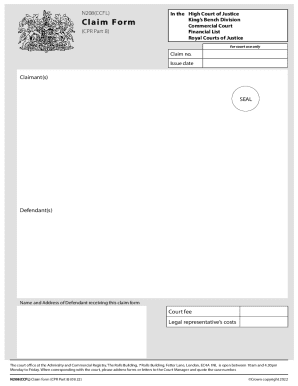
The N208 Claim Form (CPR Part 8) is a legal document used by claimants in the United Kingdom to file a claim in court regarding specific legal issues.
pdfFiller scores top ratings on review platforms




The forms are easy to find with the search tool, and very easy to use. There are even pop-ups to tell you what type of information to enter in the different fill-in fields. I'm sure I will be using more forms in the future here.
I needed help recreating a previous year and PDF Filler was so easy to use.
Who needs UK N208?
Explore how professionals across industries use pdfFiller.

UK N208 is needed by:
-
Individuals filing a claim in court
-
Solicitors assisting clients with legal claims
-
Businesses pursuing legal action
-
Legal professionals preparing court documents
-
Claimants needing a structured process for claims
Comprehensive Guide to UK N208
What is the N208 Claim Form (CPR Part 8)?
The N208 Claim Form, part of the CPR Part 8 process, serves as a legal document in the UK for initiating various court claims. It is essential for formalizing claims in civil proceedings, allowing claimants to specify the particulars of their case effectively. This court claim form plays a crucial role in ensuring that legal matters are documented and addressed within the judicial system.
Purpose and Benefits of the N208 Claim Form (CPR Part 8)
The primary purpose of the N208 Claim Form is to provide a structured method for presenting claims in court. By utilizing this form, claimants can streamline the process of filing legal claims, minimizing delays and the potential for errors. Additionally, adopting the N208 Claim Form facilitates an organized approach to legal documentation, enhancing the clarity and efficiency of court proceedings.
Who Needs the N208 Claim Form (CPR Part 8)?
The N208 Claim Form is predominantly used by claimants and solicitors involved in legal disputes. Potential users include individuals or organizations seeking to assert their rights in court. Scenarios warranting the use of the form may arise in cases where a claimant wishes to resolve issues ranging from contract disputes to personal injury claims.
How to Fill Out the N208 Claim Form (CPR Part 8) Online
Filling out the N208 Claim Form online using pdfFiller is a straightforward process. Follow these steps:
-
Access the N208 claim form template on pdfFiller.
-
Input required information in the designated fields, including claimant and defendant details.
-
Attach any necessary documentation to support your claim.
-
Review your entries to ensure accuracy before submission.
Completing these steps correctly will facilitate a smoother process in filing your claim.
Field-by-Field Instructions for the N208 Claim Form (CPR Part 8)
The N208 form contains various sections that must be filled out accurately. Key fields include:
-
Claim Number
-
Claimant's Name and Address
-
Defendant(s) Information
Particular attention should be paid to the statement of truth, which requires a signature affirming the accuracy of the provided information. Common pitfalls include omitting required fields or providing incorrect data, which can lead to rejection.
Submission Methods and Delivery of the N208 Claim Form (CPR Part 8)
There are several methods available for submitting the N208 Claim Form. Options include:
-
Electronic submission through court portals.
-
Mailing the completed form to the appropriate court office.
It's important to verify the relevant postage methods and submission deadlines specific to your local court.
Fees, Deadlines, and Processing Time for N208 Claims
Filing a claim using the N208 form may incur applicable court fees, which can vary based on the claim type. Acceptable payment methods must be confirmed prior to submission. Additionally, claimants should be aware of critical deadlines to avoid delays in processing their cases, ensuring timely progression through the legal system.
Common Rejection Reasons and How to Avoid Them
Several common errors can lead to the rejection of the N208 Claim Form. These include:
-
Incomplete fields or data discrepancies.
-
Failure to sign the statement of truth.
To ensure a smooth submission process, double-check all entries and adhere to the guidelines provided by the court.
Security and Compliance for the N208 Claim Form (CPR Part 8)
Handling sensitive legal documents like the N208 Claim Form requires strict attention to security and compliance. pdfFiller ensures the safety of your personal information with robust security measures, including 256-bit encryption and compliance with regulations such as HIPAA and GDPR. This commitment to privacy guarantees that your legal documents are managed securely during the filing process.
Experience Easy Form Filling with pdfFiller
Utilizing pdfFiller can significantly enhance your experience with the N208 Claim Form. This platform offers features that simplify the form-filling process, including eSigning capabilities and comprehensive document management tools. Users can efficiently create and submit a well-organized legal claim without the need for complicated software installations.
How to fill out the UK N208
-
1.To access the N208 Claim Form on pdfFiller, visit the pdfFiller website and search for 'N208 Claim Form'. Click to open the document.
-
2.Once the form is open, use the pdfFiller interface to navigate through each field. Click on the fillable fields to type in the required information.
-
3.Before starting, gather all necessary information such as claim details, information about the defendant, and any relevant legal documents or evidence.
-
4.As you fill in the form, make sure all information is accurate and complete. Pay attention to sections requiring a signature and the Statement of Truth.
-
5.After completing the form, review all entries for accuracy. Double-check the claim number, names, and any monetary amounts to avoid errors.
-
6.Once reviewed, you can save your progress on pdfFiller or choose to download the completed form to your device.
-
7.To submit, follow any specific instructions provided for your claim, or use the e-submit function if available. Ensure to keep a copy for your records.

Who needs to sign the N208 Claim Form?
The N208 Claim Form must be signed by either the claimant or their solicitor. It's essential to ensure the form includes the necessary signatures to validate the claim.
What documents do I need to submit with the N208 Claim Form?
Along with the N208 Claim Form, you may need to include supporting documents that substantiate your claim, such as contracts, correspondence, or evidence related to the case.
Are there any fees associated with filing the N208 Claim Form?
Yes, when filing the N208 Claim Form, you may be required to pay a court fee, which varies based on the amount being claimed. Check the court's fee schedule for accurate information.
What are the common mistakes to avoid when filling out the N208 Claim Form?
Common mistakes include incomplete information, incorrect claim numbers, and missing signatures. Review the form thoroughly before submission to prevent delays.
How long do I have to submit the N208 Claim Form after gathering my information?
There isn't a specific deadline for submitting the N208 Claim Form, but it’s advisable to file as soon as you have all necessary information and documents ready to avoid any claim lapses.
What happens after I file the N208 Claim Form?
Once you submit the N208 Claim Form, the court will review it. You will receive a claim number and further directions on the next steps in the legal process.
Related Content
Related Forms




Related Catalogs
Get the latest insights from our blog


If you believe that this page should be taken down, please follow our DMCA take down process
here
.
This form may include fields for payment information. Data entered in these fields is not covered by PCI DSS compliance.